Sunday AI Yard Companion App
0→1 iOS + Android App Design

Overview
Sunday's lawn plan subscription started on the web, but using a checklist while standing in your yard wasn't cutting it: subscribers needed answers in the moment. We took the Sunday Yard Care Companion app from zero to App Store submission in four months, a subscriber-only iOS + Android app with an AI yard companion (Sunny), a personalized task checklist, push notifications, and photo diagnostics. I was the sole designer on a product trio with one PM and one engineer.
The Challenge
Design and ship an MVP that reduced uncertainty, drove engagement, and improved retention before the spring growing season, with a target of 45,000 downloads in 4.5 months.
Getting Buy-In
The lead engineer and I proposed React Native Paper and Material Design as our foundation. Our VP pushed back: RN's reputation for feeling slightly off from native, and worry that a component library would lock us into Google's look long-term.
We addressed both. For performance, I proposed Rive for key moments like Sunny's animations, since it renders through a native engine instead of the JS bridge. For flexibility, we proposed a hybrid: use Material for high-volume UI (lists, forms, etc) and hand-build the moments that needed to feel personalized, like Sunny AI interactions. Our Senior PM helped frame the timeline trade-offs, sealing the case.
Once the VP understood the reasoning, he was on board. Material handled the scaffolding, Rive and custom design carried the personality.
Designing the Checklist
Sunday's lawn plan checklist is the heart of the product. It's what subscribers use to know what to apply, when, and how. On web it worked, but on mobile it needed to do more.
The checklist can get long — subscribers may have multiple products across a full season. My first design organized tasks chronologically, which felt logical but turned out to cause problems in testing.
User Research
I ran unmoderated usability tests through UserTesting.com on an early checklist prototype. A few things surfaced quickly:
Task status was unclear. Users couldn't tell where they stood in their plan — they needed proactive statuses like Upcoming and Start Now, not just done/not-done.
The slider wasn't landing. A days-remaining slider meant to create urgency just added visual noise; testers ignored or misread it.
Chronological order buried what mattered. One tester's feedback summed it up: the most useful thing isn't what's coming in three months, it's what needs to happen this week.
What Changed
The fix: surface what's actionable now, simplify the rest.
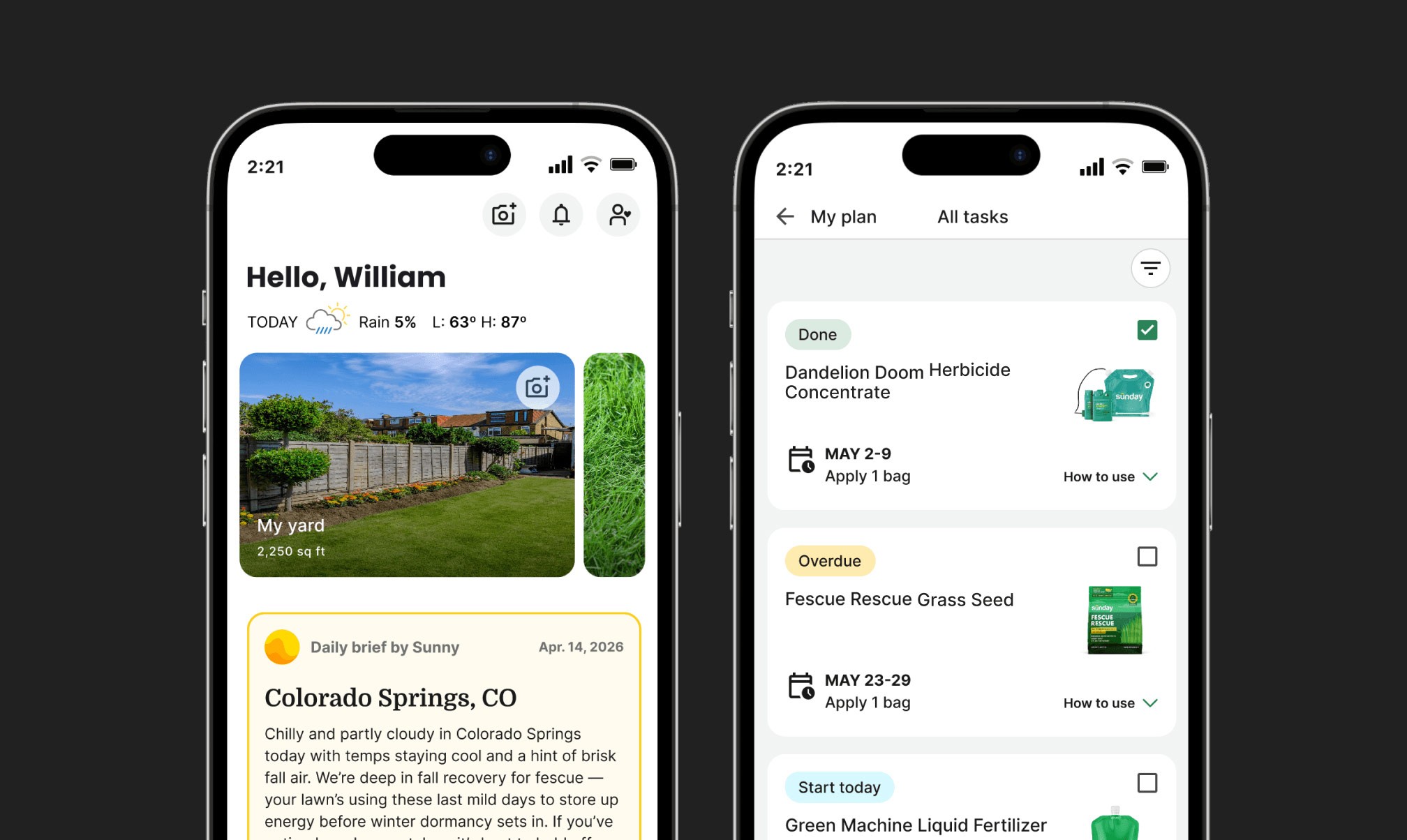
Categorized task states. Tasks are now grouped into Upcoming/Start Now, Overdue, Done, and See All — surfacing what's actionable instead of a flat timeline.
Replaced the slider with plain language. "4 days left" replaces the progress bar. No interpretation needed.
Clear date ranges instead of "Apply Time." Application windows now read as ranges (e.g., "May 2–9 · Apply 1 bag"), making clear it's a window, not a daily task.
Added product-level guidance. Each product now has a "How to use" button with step-by-step instructions and a "Know the science" link.
Home screen widget. A compact widget surfaces just the next two upcoming applications, so subscribers get the key info without opening the full checklist.

Designing the Sunny AI Experience
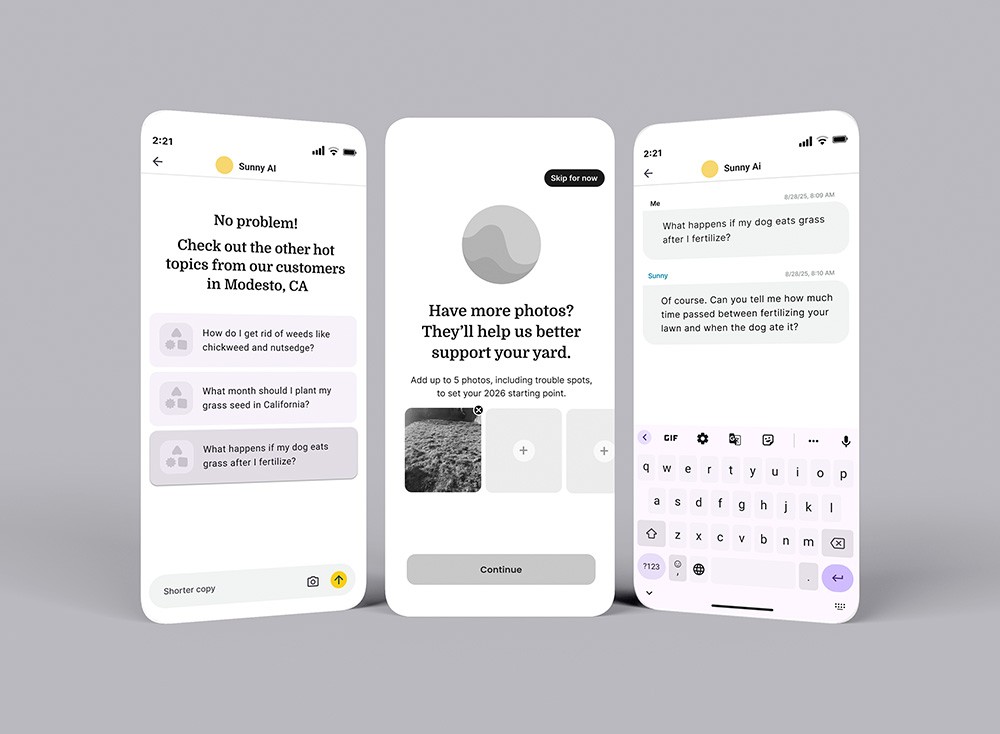
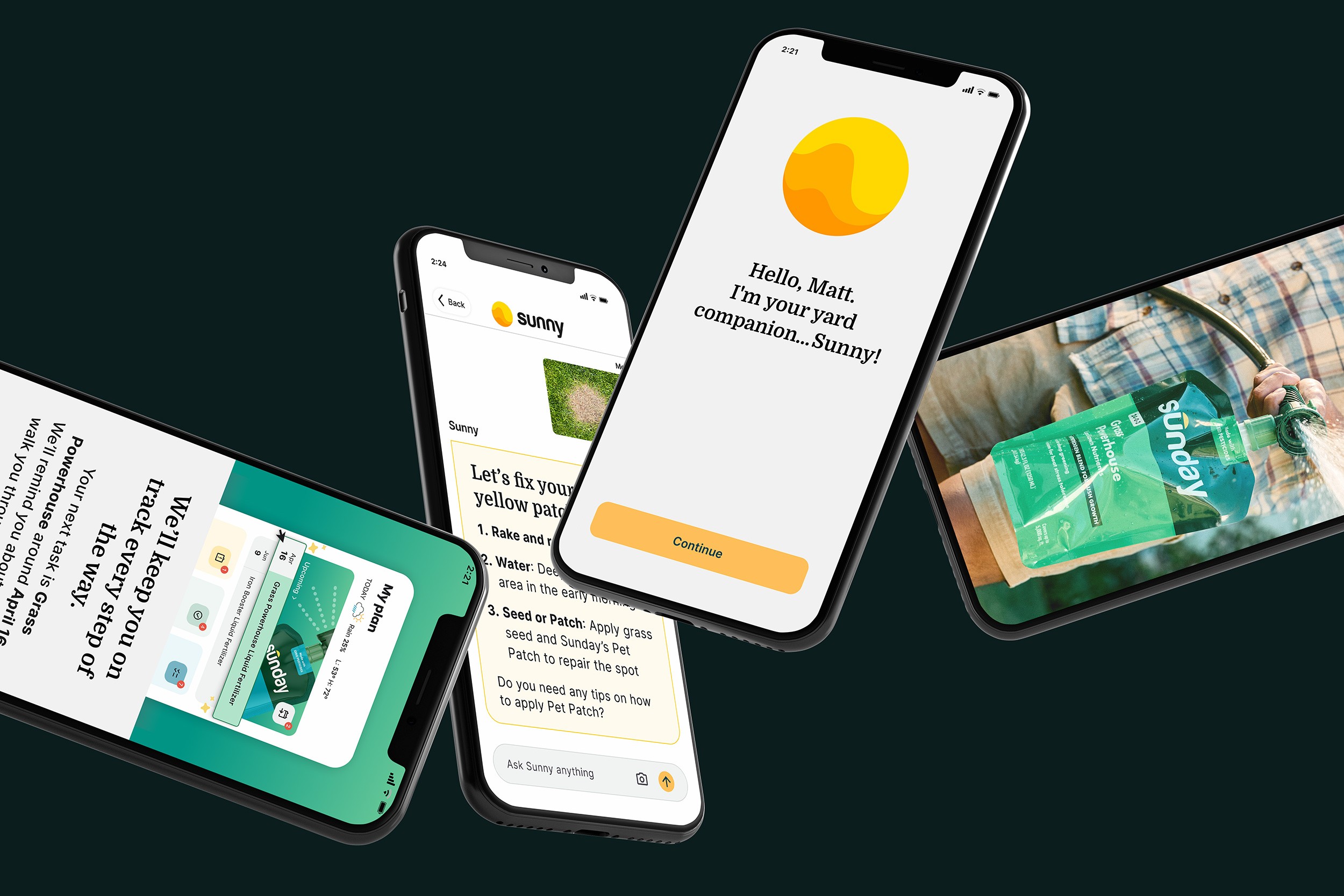
Sunny combines AI with Sunday’s lawn care expertise to deliver personalized recommendations and photo-based issue diagnosis tailored to each subscriber’s yard. I designed the end-to-end experience, including the chat interface, photo upload flow, and the presentation of AI-generated guidance throughout the app. A core challenge was helping users understand Sunny’s capabilities, provide the right context, and trust the recommendations they received.
Chat Interface & Visual Voice
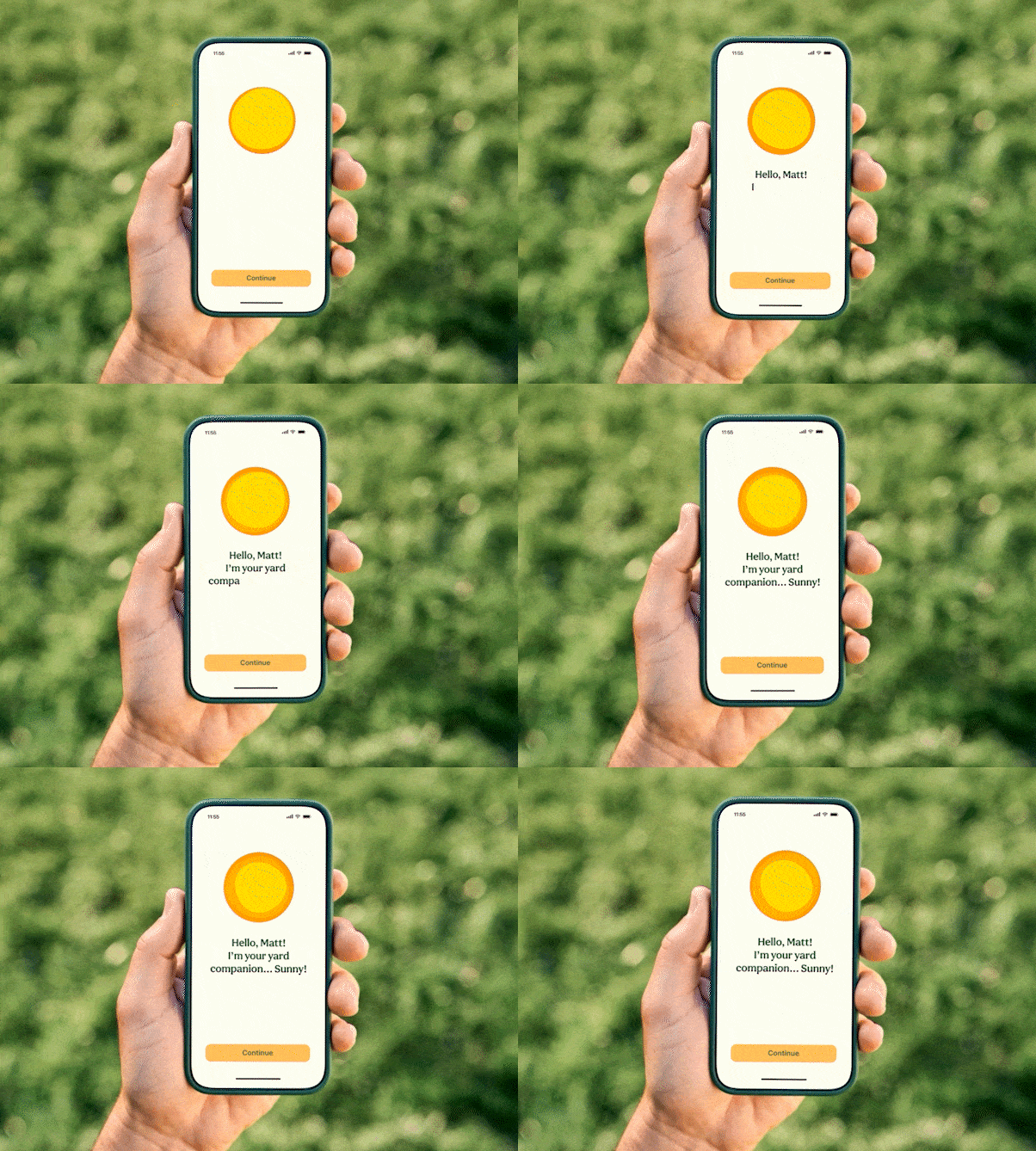
Given our timeline, we parallel pathed design and engineering — the engineer began building core flows while I was still working through the visual design, then we'd sync and he'd style to my final specs. The early Sunny chat reflected that process: a functional but unstyled interface with plain text bubbles and no brand presence. I built Sunny a distinct visual voice: a warm cream-toned response card, and a chat input bar with a persistent camera icon for photo uploads.
Photo Diagnostics
The photo diagnostic flow was one of the most engaging features in the MVP — subscribers could take a picture of a lawn problem (a yellow patch, weeds, bare spots) and get a personalized, step-by-step response from Sunny. What made it resonate wasn't just the convenience — it was the intelligence behind it. Sunny could identify issues, account for the subscriber's specific grass type, location, and existing plan, and respond with advice that felt genuinely tailored. For subscribers who'd always felt uncertain about what was actually wrong with their yard, it was a confidence-builder. This feature drove 14,000+ image uploads within the first days of full rollout.
Geo-Personalized Prompts
Sunny's home screen surfaces questions trending among neighbors in the subscriber's city — making the experience feel alive and locally relevant without any extra effort from the subscriber.
Navigating the Apple Roadblock
One of the more challenging moments in the project didn't come from the design — it came from the App Store.
Our original plan was to distribute the app as unlisted on Apple — live but not searchable, accessible only via direct link — keeping non-subscribers from hitting a login wall. Apple declined. We pivoted to a public listing and built a careful staged rollout: 25% of subscribers, then 50%, then 100% — using each phase to triage bugs and align communication so subscribers knew the app was for them. The launch email became our highest click-through campaign.
We shipped 7 days late due to the Apple review process, not design or engineering — and by the time we hit 100%, nearly all major bugs had already been resolved through the staged rollout.

Results
The numbers below are from the rollout period, with the app reaching 100% of subscribers on Apr 9:
32.3k total downloads — in 27 days
60k total downloads — in just over 2 months, beating our target of 45k in 4.5 months well ahead of schedule
83.9% onboarding completion rate — and climbing post accessibility fixes
Highest email click-through rate of any campaign at Sunday
53.8k Sunny messages sent — 42% of all Sunny messages now happening inside the app, up 100% YoY
102.1k My Plan actions — how to use, tasks, and science content all actively engaged, doubling week over week
57k "How to use" taps — most popular in-app action
21.1k "Know the science" taps — validating the research-driven decision to add educational content to each product
24k tasks updated — subscribers actively working through their plans
14.45k Sunny messages with images sent — photo diagnostics driving real engagement
Retention tracked at or above industry benchmarks across Day 1, Day 7, and Day 14 — early signal that the app was building real habit, not just curiosity downloads
Reflections
Scope is a design decision
Shipping a 0→1 app in under six months with a product trio is an exercise in radical prioritization. Every feature decision came with a tradeoff, and the PRD's "non-goals" list was as important as the feature list. Intentional scoping — deferring guest mode and in-app checkout — is what made on-time delivery possible.
Test early, even on simple interactions
The user testing on the checklist was a reminder that even the simplest interactions deserve validation. A progress bar I thought would create helpful urgency was creating confusion instead. Talking to six users before finalizing that design saved significant rework down the line.
Distribution decisions are UX decisions
If I could go back, I'd advocate earlier for resolving the Apple distribution question as a design problem, not just an engineering or ops one. The unlisted vs. public decision had real UX implications — and had we aligned on it sooner as a team, we would have had more time to design a better leads-to-subscribers handoff within the app itself.
Test accessibility at the extremes
The accessibility issues we caught post-launch were a good reminder to test at the edges. About 20% of subscribers use enlarged font sizes, and at the largest system settings, a button in the onboarding flow became unreachable. We tested for accessibility, but not at the biggest end of the scale. We caught it through the staged rollout and shipped a fix quickly — but it's now something I build into QA from the start.